

Yes, it's real: You can replace your PC with your smartphone. Here's how.
Premium domains for sale
Freedom Is Back In Style
Android started out as a mobile operating system, but over the years, it became much more. Part of that vision was realized when Google killed Chromebooks in favor of Googlebooks. You actually don’t need one of these to get a similar desktop experience. In fact, you can replace your laptop or PC with your Android phone now.
Freedom Is Back
In Style
Premium domains for sale
Okay, before we dive too deep, you should know that Android’s desktop mode doesn’t work on all Android devices. But it is compatible with many of the most popular handsets in the United States, including new Samsung phones with DeX and Google Pixel phones with Android Desktop Mode.
Samsung DeX is more refined than Pixel’s Android Desktop Mode.
To use desktop mode on Android, you’ll need several things:
- Computer monitor with either a USB-C port or HDMI port for video.
- USB-C-to-USB-C cable or an HDMI cable paired with a compatible USB-C adapter for the connection.
- If you’re using an HDMI cable with an adapter, you’ll also need a power cable that can plug into the adapter; otherwise, your battery will drain quickly. Those using a USB-C cable should receive power to their device from the monitor without extra hardware.
- Wireless Bluetooth mouse and keyboard to control the interface.
These steps could vary slightly, depending on your make and model of phone. For today’s example, we’re testing a Samsung Galaxy Z Fold 8 on One UI 9 (Android 17) and a Google Pixel 10 Pro XL running Android 17.
Why should you try desktop mode on Android?
Now, before we get started, you might wonder why you may wish to use desktop mode on Android. Aside from the fact that it is just cool to have a desktop experience that you can pull out of your pocket and connect to a monitor at any time, it can also replace your laptop or desktop in some cases.
Android desktop mode is great for browsing the web, answering emails, writing in your favorite apps, and watching videos. Because it’s Android, many existing apps from the Google Play Store will work, though some are better optimized than others. You can even play some popular Android games, like Genshin Impact, Wuthering Waves, and more, provided you connect a Bluetooth game controller.
What Android desktop doesn’t do is replace a gaming PC. You can’t get your Steam game library to work, at least not reliably, and even if you could, most phones aren’t powerful enough and don't mitigate heat enough for sustained AAA gaming performance.
That said, Android desktop mode is a great tool for tinkering around and doing many typical tasks usually reserved for dedicated hardware.
RELATED: Google is about to overhaul the Android. You'll either love it or hate it.
 lixu/Getty Images
How to use desktop mode on Samsung Galaxy
To get started, make sure your phone is powered on and unlocked to the home screen. Next, connect your Samsung Galaxy phone to your monitor using your USB-C cable or HDMI cable with USB-C adapter. If your monitor doesn’t immediately light up with a desktop interface from your phone, open the Settings app on your Galaxy device and tap “Connected devices,” followed by “Samsung DeX.” Lastly, tap “Connected display” and choose “Extended.” You should now see a desktop interface on your monitor.
Next, you’ll need to set up your wireless keyboard and mouse. Back in the main Settings app, choose “Connections” and tap on “Bluetooth” (do not touch the toggle switch but tap the word itself). Make sure your mouse and keyboard are in pairing mode, and hit the “Scan” button in the top right corner. Follow the pairing instructions, and you’re all set.
Samsung DeX is available on many Samsung devices, including Galaxy S8 and up, the original Z Fold and up, and the Tab S4 series and up.
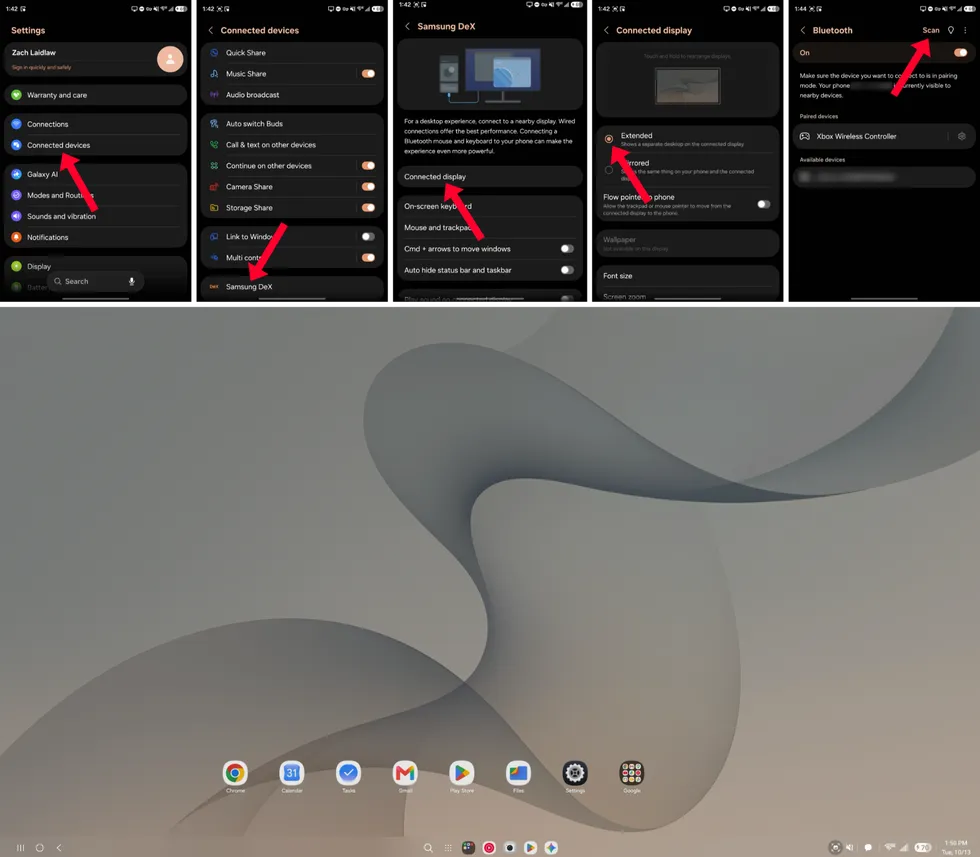 Samsung DeX on Samsung Galaxy Z Fold 8 on One UI 9 (Android 17)/Zach Laidlaw
How to use desktop mode on Google Pixel
To get started, power your phone on and unlock it to the home screen. Next, connect your Google Pixel device to your monitor using your USB-C cable or HDMI cable with USB-C adapter. You should immediately see a pop-up that asks if you want to connect your external display in “Desktop” mode or “Mirror” mode. Choose “Desktop,” and your monitor should light up with a desktop interface.
Now for the mouse and keyboard. Make sure these two devices are in pairing mode. Then on your Pixel, open the Settings app, tap “Connected devices” and “Pair new device,” and wait for the mouse and keyboard to appear before finalizing the connection. That’s it!
Android Desktop Mode works on Google Pixel 8 and up.
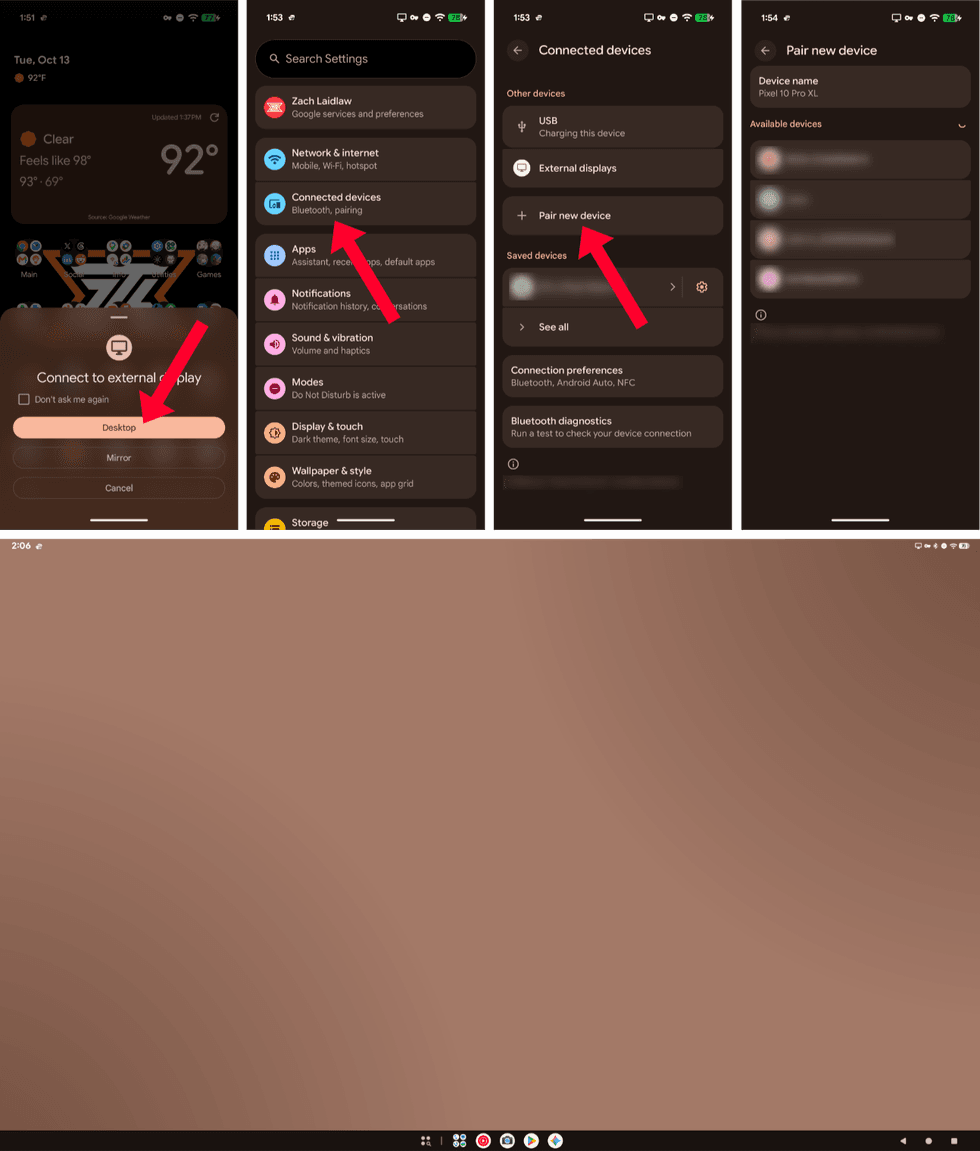 Google Pixel Android Desktop Mode on Android 17/Zach Laidlaw
No, that blurry brown rectangle isn't a broken image link (or a censored pic). It's the wallpaper you see on Google Pixel’s desktop. All the time. Yuck.
Well, nobody's perfect.
Thanks to better wallpaper and stronger app support, Samsung DeX is more refined than Pixel’s Android Desktop Mode. That is to be expected, though, as Samsung has worked on DeX since 2017, while Google launched the official version of Android Desktop Mode in March of this year.
While Samsung DeX is far more enjoyable and useful in my opinion, both work in a pinch if you ever need to access a desktop experience from your Android phone.
Like Blaze News? Bypass the censors, sign up for our newsletters, and get stories like this direct to your inbox. Sign up here!
More from this network:
Domains for Sale · GOTPeople.org · TheDSAPlatform · The Truth About Socialism
What's Your Reaction?
 Like
0
Like
0
 Dislike
0
Dislike
0
 Love
0
Love
0
 Funny
0
Funny
0
 Wow
0
Wow
0
 Sad
0
Sad
0
 Angry
0
Angry
0

I am just an average American. My teen years were in the late 70s and I participated in all that that decade offered. Started working young, too young. Then I joined the Army before I graduated High School. I spent 25 years in, mostly in Infantry units. Since then I've worked in information technology positions all at small family owned companies. At this rate I'll never be a tech millionaire. When I was young I rode horses as much as I could. I do believe I should have been a cowboy. I'm getting in the saddle again by taking riding lessons and see where it goes.
Premium domains for sale

























Comments (0)