

Online threats are swamping the internet. Block them with this powerful browser feature.

Premium domains for sale
Freedom Is Back In Style
If there was one lesson to take away from Black October, it was that the internet is becoming an increasingly more dangerous place. Website vulnerabilities, data leaks, and malicious sites are just some of the dangers you might encounter on the web. To stay safe, Chrome has a powerful protection feature you should enable now.
Freedom Is Back
In Style
Premium domains for sale
Chrome is the most widely used internet browser on the planet. With an estimated 3.62 billion users worldwide, it is one of the most trusted ways to get to the internet. It is also one of the most targeted browsers by hackers who wish to exploit any potential flaws for personal gain.
The setting syncs to your Google account, so you only have to change it in one spot to cover all of your devices.
This is why enhanced protection mode exists. Google brought enhanced protection mode to the Chrome browser in 2020, and the company has been improving it ever since. Just this month, it added several more features to keep you safer as you surf the web.
One of those features – suspicious site warnings – can display one of two messages on your screen when a malicious website is detected.
The “suspicious sites” warning appears if Chrome believes the website might be a threat. In this case, you have the option to choose to go backward to avoid the site, or proceed at your own risk.
The “dangerous sites” warning is harder to avoid. When Chrome believes a website is dangerous with high confidence and a high risk to the user, it takes over your entire screen with a bright red warning that reads, “Attackers on the site you're trying to visit might trick you into installing software or revealing things like your passwords, phone, or credit card numbers. Chrome strongly recommends going back to safety.” You’re only given one obvious option — a button that takes you back to safety. This ensures that you don’t accidentally reach the website and infect your device.
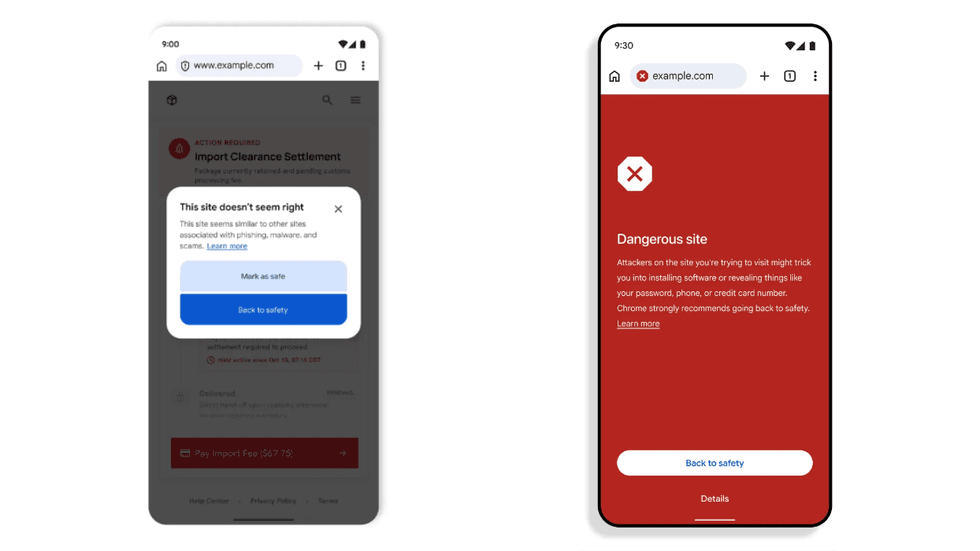 Chrome suspicious sites warnings/Google
When enhanced protection mode is enabled, users also now receive added ClickFix safety measures. Google describes ClickFix as “a social engineering technique that tricks users into manually copying and executing malicious commands on their own computers in order to ‘fix’ a fake issue.” For instance, if you’re on the phone with a scammer posing as tech support and they send you a message with malicious code that they want you to copy and run on your computer, Chrome can now help identify malicious copied code and display a warning to stop you from executing it.
RELATED: Normal people want AI that lies less and protects more. This new model delivers.
 Kenneth Cheung/Getty Images
How to enable enhanced protection on Chrome
You can activate enhanced protection mode in Chrome either on your phone or through the browser on a laptop or desktop computer. The setting syncs to your Google account, so you only have to change it in one spot to cover all of your devices, assuming you’re logged in properly. If not, you will need to change the setting manually for every device you own.
To enable enhanced protection, open the Chrome browser on your phone or computer. I’m using a mobile phone for the sake of this guide. Tap the three-dot menu in the top-right corner of your screen. From the drop-down, choose "Settings.” On the next page, select “Privacy and security,” followed by “Safe Browsing.” On this final page, you will see three different options:
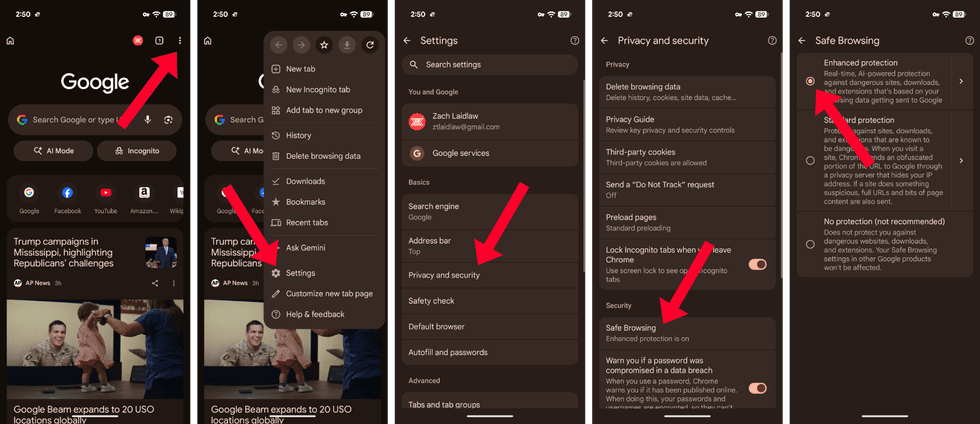 Google Chrome enhanced protection/Zach Laidlaw
- No protection: As the label states, this setting won’t protect you from any potential threats you might run into online. Your browsing habits are wide open to dangerous websites, malicious downloaded files, and other threats that could give your device a virus or cause future trouble.
- Standard protection: This is Chrome’s default mode. With this setting, Chrome can help protect your device against suspicious websites, downloaded files, and even extensions.
- Enhanced protection: With enhanced protection, Google’s advanced AI analyzes website data in real time to scan for online threats. This feature also extends to other Google apps and services to make them safer, like emails in Gmail.
Check that enhanced protection is on, and you’re all set. Chrome will now serve as a sentry, watching over your browser activity to keep you safe from rogue sites and other online vulnerabilities that mean to do you harm.
Like Blaze News? Bypass the censors, sign up for our newsletters, and get stories like this direct to your inbox. Sign up here!
More from this network:
Domains for Sale · GOTPeople.org · TheDSAPlatform · The Truth About Socialism
What's Your Reaction?
 Like
0
Like
0
 Dislike
0
Dislike
0
 Love
0
Love
0
 Funny
0
Funny
0
 Wow
0
Wow
0
 Sad
0
Sad
0
 Angry
0
Angry
0

I am just an average American. My teen years were in the late 70s and I participated in all that that decade offered. Started working young, too young. Then I joined the Army before I graduated High School. I spent 25 years in, mostly in Infantry units. Since then I've worked in information technology positions all at small family owned companies. At this rate I'll never be a tech millionaire. When I was young I rode horses as much as I could. I do believe I should have been a cowboy. I'm getting in the saddle again by taking riding lessons and see where it goes.
Premium domains for sale

























Comments (0)