

This new iPhone update can warn you if you’re about to get scammed
Premium domains for sale
Freedom Is Back In Style
Online scams are getting more sophisticated, with attackers using AI to manipulate their voices on phone calls, change their faces on video chats, and write more convincing messages. To help combat the growing threat, Apple brought a new scam-busting feature to iOS 27 called Impersonation Risk Detection.
Freedom Is Back
In Style
Premium domains for sale
Impersonation Risk Detection monitors the actions you take within apps to identify red flags that indicate you are about to become the victim of a scam or online attack.
Social engineering schemes were among the most reported crimes in 2025, with more than $7 billion in total losses.
It specifically targets social engineering threats, or scams where cybercriminals trick users into handing over personal data. These are usually carried out through phishing attempts and baiting via personal interactions, making them impervious to typical security measures, like passkeys or two-factor authentication, since you are divulging your information directly to the hacker.
To make a social engineering attack work, the cybercriminal has to engage with his target — usually through emails, messages, or phone calls — and convince the target to take action that compromises his data or security. It may sound unrealistic, but according to the FBI’s Internet Crime Report, social engineering schemes were among the most reported crimes in 2025, with more than $7 billion in total losses.
Scammers may reach out as a bank employee, claiming that your account was hacked and that they need your information to secure it. Or they might pose as a member of the government, claiming you have unpaid parking tickets or owe back taxes to the IRS. In the worst-case scenario, they’ll pretend to be a family member in a dangerous situation and in desperate need of money.
These are the types of engagements that Impersonation Risk Detection is built to detect and thwart.
According to Apple, the company can analyze “interaction patterns, timing, context, and basic sensor data” on your device to determine if and when scams like these are about to take place. Now, Apple doesn’t explain exactly how its threat algorithm works, but it promises that this “information is analyzed on-device, so Apple never receives the data used to generate the risk level.”
Furthermore, Apple claims it won’t snoop on the content in your most personal apps, like Messages, Mail, and Photos. It’s primarily searching for isolated problematic interactions with other users you talk to online, whether that’s a friend or a complete stranger.
RELATED: Social media scams are up 700%. Here’s how to stay safe.
 Media Trading Ltd/Getty Images
There are a couple more caveats to consider before you activate Impersonation Risk Detection:
- By enabling the feature, you give developers access to your risk threat level, as determined by Apple. Again, Apple claims that threats are measured on-device, and developers never actually see the analyzed data — they only receive the final risk threat level itself. Still, having your interactions scanned and measured may be too intrusive for some.
- Apps must support Impersonation Risk Detection before they can warn you there’s a problem. That means there will be some apps on your phone that don’t have this feature, at least for several months. That said, as more third-party apps receive their annual iOS compatibility updates, most of your apps should be supported soon.
If you’re okay with these, proceed to the next step.
To enable Impersonation Risk Detection, simply open the Settings app, scroll down, and select Privacy & Security. Once inside, scroll to the bottom and tap on Impersonation Risk Detection. Switch the toggle to the green active position, and you’re all set.
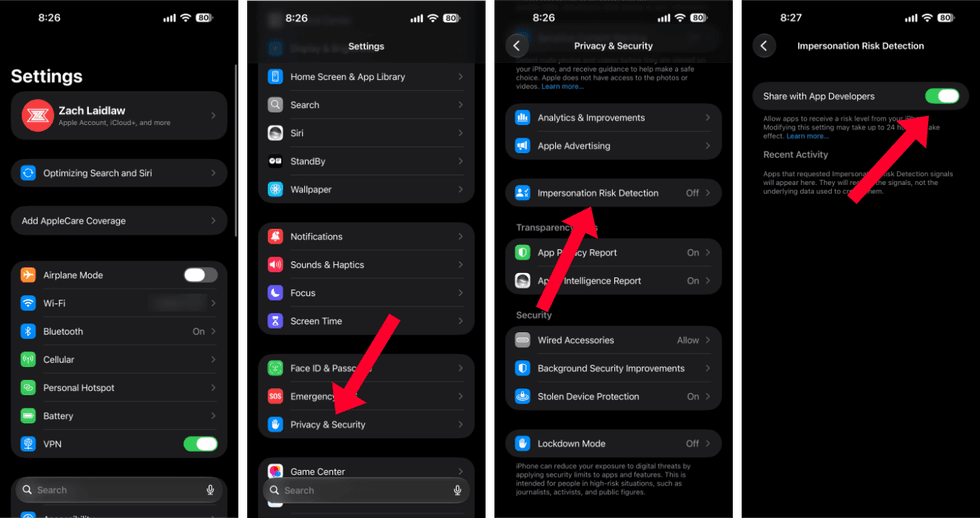 Impersonation Risk Detection in iOS 27/Zach Laidlaw
Your phone will now monitor your app activity for potential social engineering threats. Updates will appear in the Recent Activity section beneath the toggle, listed under one of three categories:
- Unknown signals that no malicious activity was detected within a recent app interaction.
- Medium means that some malicious activity was detected. Proceed with caution.
- High indicates that a significant degree of malicious activity was detected. You should refrain from further interactions.
There’s a clear trade-off to Impersonation Risk Detection. On one hand, it’s a useful tool that can point out potential scams and stop them before they become a problem. On the other hand, you may not trust Apple to monitor your activity and share the results with app developers. Only you can decide if one risk is worth the outcome.
Impersonation Risk Detection is only available on iPhones running iOS 27. To upgrade, find the Software Update section in General within the Settings app and download the latest version. After the update is complete, you’ll get access to other new fresh features, like the new Siri, Safari Notify Me alerts, and more.
Like Blaze News? Bypass the censors, sign up for our newsletters, and get stories like this direct to your inbox. Sign up here!
More from this network:
Domains for Sale · GOTPeople.org · TheDSAPlatform · The Truth About Socialism
What's Your Reaction?
 Like
0
Like
0
 Dislike
0
Dislike
0
 Love
0
Love
0
 Funny
0
Funny
0
 Wow
0
Wow
0
 Sad
0
Sad
0
 Angry
0
Angry
0

I am just an average American. My teen years were in the late 70s and I participated in all that that decade offered. Started working young, too young. Then I joined the Army before I graduated High School. I spent 25 years in, mostly in Infantry units. Since then I've worked in information technology positions all at small family owned companies. At this rate I'll never be a tech millionaire. When I was young I rode horses as much as I could. I do believe I should have been a cowboy. I'm getting in the saddle again by taking riding lessons and see where it goes.
Premium domains for sale
























Comments (0)