

How to get iPhone alerts when the latest story hits Blaze News

Premium domains for sale
Freedom Is Back In Style
Breaking news, big events, and the latest stories from your favorite tech writer (cough, cough). These are just some of the reasons you’ll want to receive a notification when a story hits the Blaze News homepage, and thanks to a new feature in iOS 27, now you can know before anybody else.
Freedom Is Back
In Style
Premium domains for sale
Okay, so this doesn’t only work on Blaze News. You can technically enable it for any page on the web, whether you’re waiting for a product to go on sale, tracking updates for your favorite sports team, or following election results during the midterms this November. Anything.
Notify Me in Safari is exclusive to devices running iOS 27, iPadOS 27, and macOS 27.
It’s all possible through an iOS 27 feature called Notify Me that is tucked inside Safari, Apple’s first-party web browser for iPhone, iPad, and Mac. The premise of Notify Me is simple: When you find a webpage that you want to monitor for changes, you can now set up an alert directly on your device with just a few taps.
For example, navigate to the Blaze News homepage on iPhone, open the menu in the bottom left corner of your screen, and choose Notify Me. Next, tell Safari which part of the page you want to watch. Keep your instructions short and concise. In this case, a simple sentence will do, such as, “Send an alert when a new article appears on this page.”
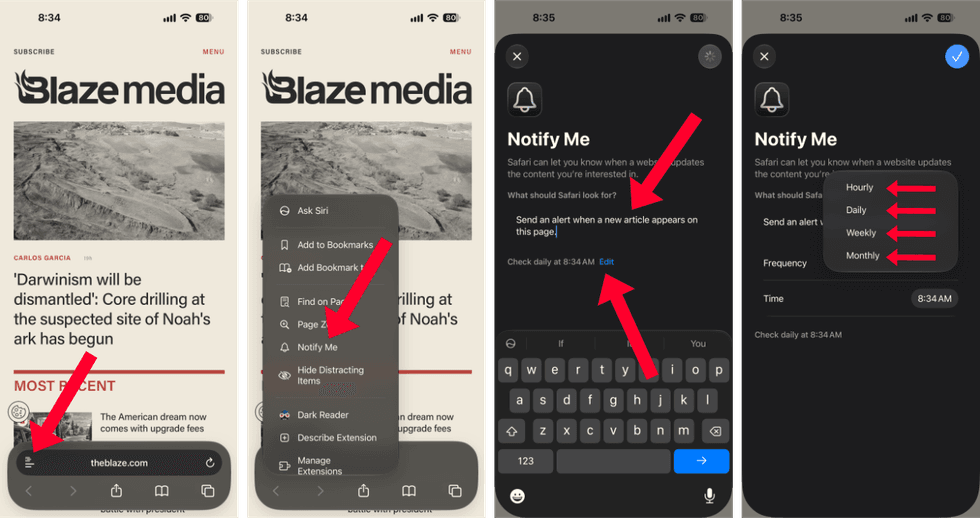 Notify Me in Safari on iOS 27/Zach Laidlaw
Below that, set your frequency. You have four options to choose from:
- Hourly notifications monitor a page down to the minute.
- Daily notifications are customizable to an exact hour and minute each day.
- Weekly notifications include options for specific days of the week, down to the hour and minute.
- Monthly notifications check for changes one day per month at an exact hour and minute.
Frequency ultimately determines how often Safari scans a page and sends notifications. If you’re following the Blaze News homepage, a Blaze News writer, or a specific show on BlazeTV, you may wish to get updates hourly or daily so that you don’t miss a thing, while a longer frequency may be appropriate for other pages. You decide. You can always change this setting later, so you’re never locked into your notification schedule.
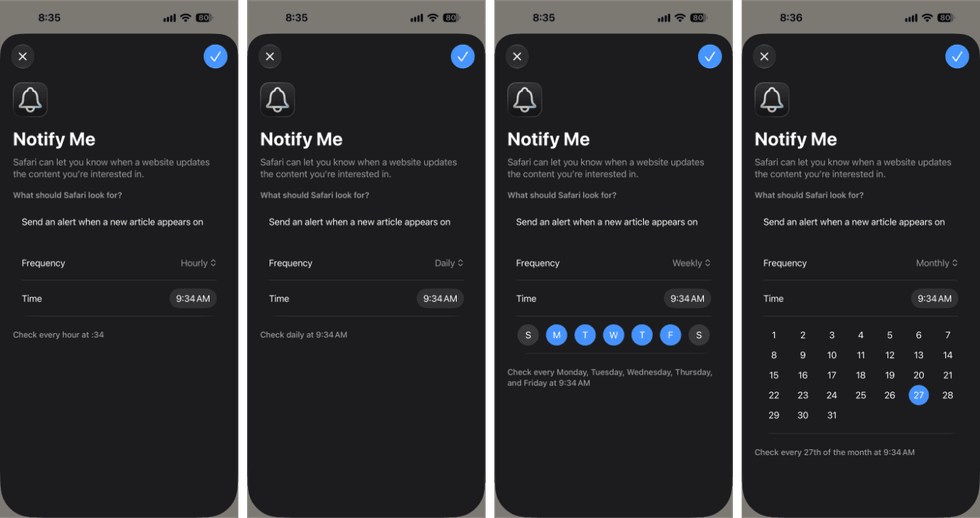 Notify Me Frequency in Safari on iOS 27/Zach Laidlaw
After that, tap the blue checkmark in the top right corner of the screen, and you’re all set! You will now receive alerts for Blaze News based on your defined frequency.
RELATED: Your iPhone's new 'safety' setting will nag you to insanity — turn it off like this
 Yuliia Kaveshnikova/Getty Images
Now that your Notify Me alert is set up, there are two ways to change it. The easiest way is to go back to the webpage you wanted to track and find the “Notify Me” banner at the top. Tap “Edit” on the right side, and from there, you can rewrite the instructions, change the frequency, or, if you no longer need the alert, delete it entirely.
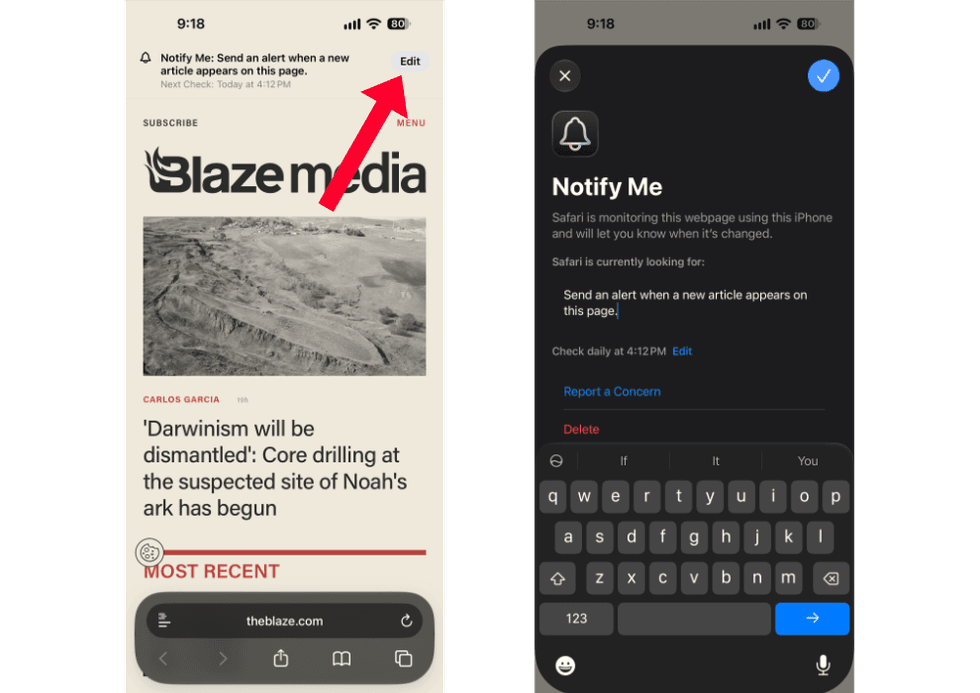 Notify Me Edit Options in Safari on iOS 27/Zach Laidlaw
For the second path, open the Settings app, scroll down to the bottom and select “Apps,” then find Safari in your app list. Give that a tap and scroll to the very bottom of the Safari settings page. Select “Notify Me,” and you’ll see an entire list of your alerts sprawled across the web (if you have more than one). Choose the one you want to edit or delete. Although this screen looks a little different than the previous section, the adjustment options are the same — write the prompt, change the frequency, or delete the alert altogether.
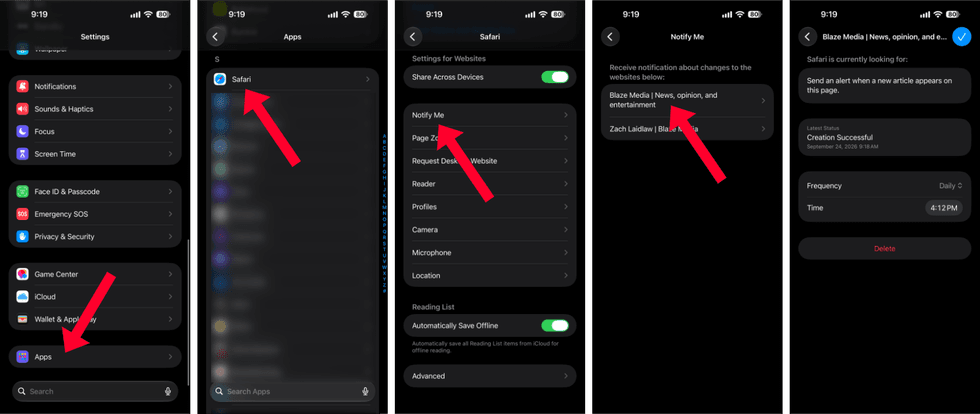 Notify Me Edit Options in Safari on iOS 27/Zach Laidlaw
Notify Me in Safari is exclusive to devices running iOS 27, iPadOS 27, and macOS 27. That means you’ll need to upgrade to the latest software to take advantage of this feature. Otherwise, you risk missing something as you continue to monitor webpages manually.
Like Blaze News? Bypass the censors, sign up for our newsletters, and get stories like this direct to your inbox. Sign up here!
More from this network:
Domains for Sale · GOTPeople.org · TheDSAPlatform · The Truth About Socialism
What's Your Reaction?
 Like
0
Like
0
 Dislike
0
Dislike
0
 Love
0
Love
0
 Funny
0
Funny
0
 Wow
0
Wow
0
 Sad
0
Sad
0
 Angry
0
Angry
0

I am just an average American. My teen years were in the late 70s and I participated in all that that decade offered. Started working young, too young. Then I joined the Army before I graduated High School. I spent 25 years in, mostly in Infantry units. Since then I've worked in information technology positions all at small family owned companies. At this rate I'll never be a tech millionaire. When I was young I rode horses as much as I could. I do believe I should have been a cowboy. I'm getting in the saddle again by taking riding lessons and see where it goes.
Premium domains for sale














Comments (0)